
1. Who can use the NHS App?
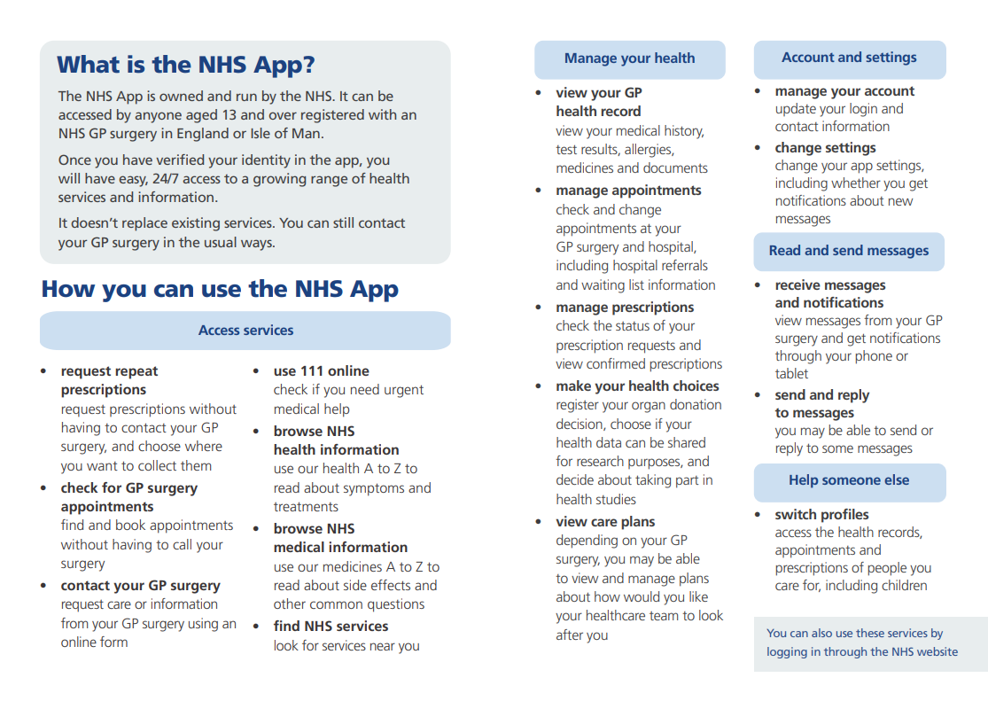
To use the NHS App or log in through the NHS website you must be:
- aged 13 or over
- registered with an NHS GP surgery in England or the Isle of Man
If you're aged 13 to 15, you’ll need to contact your GP surgery for access to GP online services before you can use the NHS App.
If you’re a member of the armed forces or are a veteran, service leaver or non-mobilised reservist, you may not be able to use the app (the Ministry of Defence is responsible for providing general healthcare and some areas of specialist healthcare for most serving personnel and mobilised reservists).
If you’re registered at a surgery provided by Defence Medical Services, you cannot currently use the NHS App.
2. Is the NHS App free to use/download?
Yes, the NHS App is completely free to download and use. However, if you order a repeat prescription via the app, you may need to pay your usual prescription costs when collecting it from the pharmacy.
Helpful to know
You will need a smartphone or tablet that runs on iOS or Android.
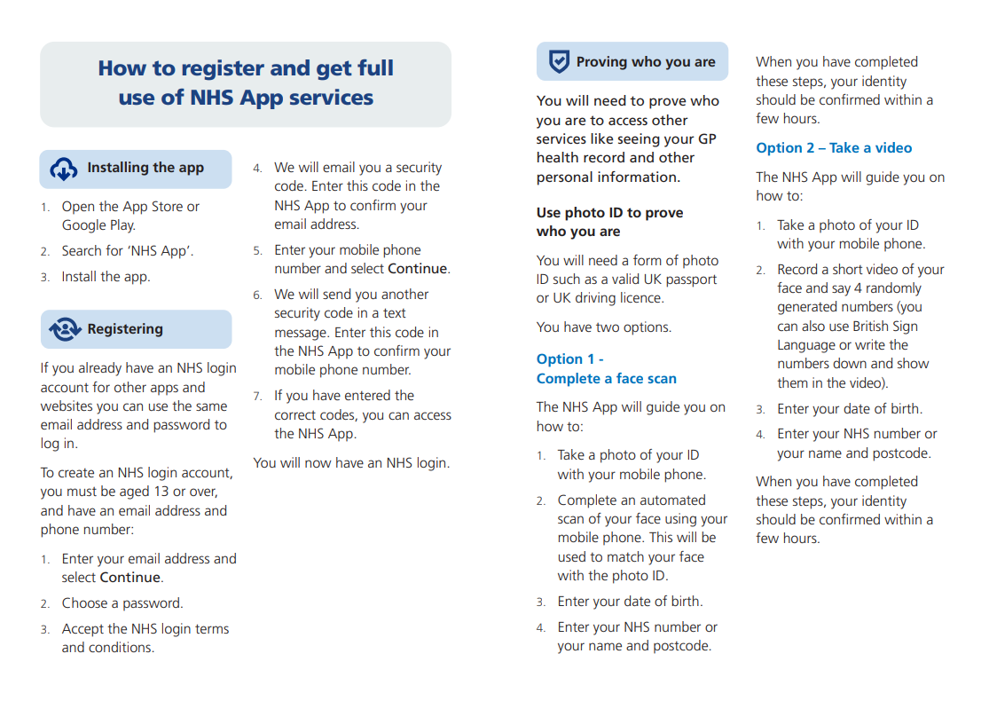
Search ‘NHS App’ in the App Store or on Google Play
If you do not have access to a smartphone, you can also access the same services in a web browser by logging in through the NHS website.
For further assistance with downloading and accessing the app, watch this useful video: Meet your NHS App (BSL)
3. Where can I get the Linkage/Account key and Pin from?
A linkage key is a secure, unique code that connects your NHS App account to your medical records at your GP practice. It is an alternative to using photo ID for verification.
You can collect your Linkage/Account Key and ODS Code directly from Reception.
When you visit us, our team will:
- Print your details for you
- Help you set up your NHS App account
- Answer any questions you may have
- Show you how to navigate and use the NHS App
This ensures your login information is kept secure and that you receive support if needed.
4. What is Proxy Access in the NHS App?
Proxy access allows someone to access and manage another person’s NHS App account on their behalf, with the appropriate permissions. This is commonly used for parents managing their children’s healthcare or carers supporting someone with additional needs.
For detailed guidance, visit the official NHS page on: Parent and guardian proxy access for children – NHS
5. How can I set up proxy access in the NHS App?
To set up proxy access, you need to:
- Once the GP practice approves your request, they will enable proxy access, allowing you to log in to your own NHS App and manage the other person’s account under your profile.
- Speak to the GP practice of the person you want to support.
- Submit a proxy access request letter, which typically includes proof of your relationship and consent from the individual, if applicable.
- To gain assistance in setting up proxy access on the NHS app, click here How to get proxy access – NHS.
6. Do both the patients need to be registered at the same practice to enable Proxy Access?
Yes, proxy access can only be granted if both you and the patient you are supporting are registered at the same GP practice.
7. Why are the records from my previous surgery not visible on my NHS App?
The NHS App allows you to view new information added to your GP record from the date the GP's online access is switched on. This includes:
- Name, age and address
- Allergies and adverse reactions
- Treatments and medications
- Immunisations
- Test results
- Letters
- Notes and other entries added to your GP record
We can only provide online access to the medical records created since you registered with our surgery.
We cannot give online access through the NHS App to information from the time you were registered at a different GP practice. This is because those records were created under a different data‑holding organisation.
- A SAR gives you access to all information held about you
- It may take up to one calendar month for the practice to provide this information
8. What is a Subject Access Request (SAR) and how do I submit it?
A Subject Access Request (SAR) is a legal right under the UK GDPR that allows you to ask for a copy of the personal information an organisation holds about you. In the NHS, this usually means your medical records, correspondence, test results, and any other data your GP practice or healthcare provider holds about you.
You can submit a SAR in writing, by email, or verbally. The request can be made to any staff member at the Reception. We will aim to respond to your request within 7–14 working days, although legally we have up to one calendar month to provide your information. The records will be printed out and can be collected from the Reception.
9. Why are some of my Medications not in the Medication list on the NHS App?
Only Repeat medications appear in the NHS App for viewing and requesting.
Some prescriptions will not show on the app because they are classed differently in our clinical system (EMIS):
Acute medications
These are one‑off or short‑term prescriptions issued for a specific reason.
They are not added to your repeat list and therefore do not appear in the NHS App.
Variable Use Repeat medications
These are medications you take only when needed or in varying amounts, rather than on a fixed schedule.
Because the dose and frequency can change, they are not displayed as standard repeats in the NHS App.
If you need additional medication, you will need to submit a PACO Blinx Medication Request Form so the GP can review and process it safely.